Best Cloud Data Warehouses in 2026: Which Platform Fits Your Analytics Stack?
Compare Snowflake, BigQuery, Amazon Redshift, Databricks SQL, ClickHouse Cloud, and MotherDuck — and understand which warehouse architecture matches your team before you commit.
Disclosure: This article contains affiliate links. We may earn a commission if you sign up through one of our links, at no extra cost to you.
TL;DR (pricing verified May 2026): Snowflake — mainstream multi-cloud warehouse for enterprise; Standard edition ~$2/credit (AWS US East on-demand) plus
$23/TB-month storage. BigQuery — serverless query pricing, strongest fit in Google Cloud; $6.25/TB scanned on-demand, $0.02/GB-month active storage, 1 TB of queries free per month. Amazon Redshift — AWS-native with tight ecosystem integration; Serverless from $0.375/RPU-hour ($1.50/hour minimum), Provisioned from $0.543/hour. Databricks SQL — best when warehousing blends with ML and data engineering; per-second DBU billing, no fixed starter price. ClickHouse Cloud — performance-sensitive analytics on high-cardinality event data; compute $0.22–$0.39 per 8 GiB unit-hour, storage $25.30/TB-month. MotherDuck — DuckDB-simple managed cloud for smaller teams; Lite free (3 users, 10 GB), Business $250/org/month plus usage.
Pricing at a glance
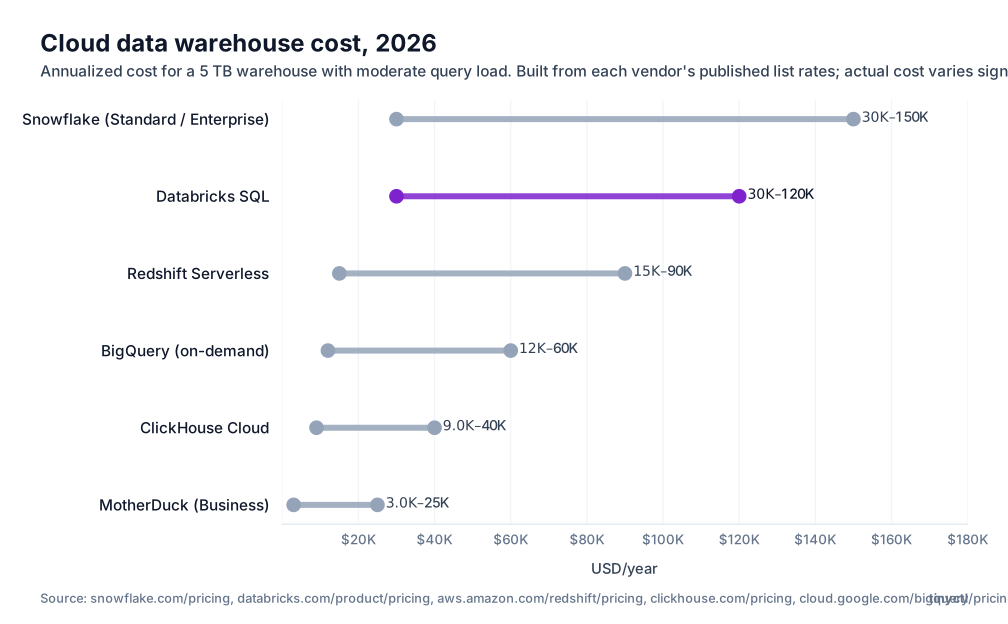
The Best Cloud Data Warehouses — Quick Picks by Team Type
| Platform | Best for | Compute model | Multi-cloud |
|---|---|---|---|
| Snowflake | Enterprise, multi-cloud | Virtual warehouses (credit-based) | Yes |
| BigQuery | GCP teams, serverless | Serverless, per-TB scanned | GCP only |
| Amazon Redshift | AWS-native teams | RA3 nodes + serverless option | AWS only |
| Databricks SQL | Data + ML teams | SQL warehouses on Delta Lake | Yes |
| ClickHouse Cloud | High-performance event analytics | Managed ClickHouse clusters | Yes |
| MotherDuck | Small teams, DuckDB workflows | Serverless DuckDB | Cloud + local hybrid |
Not Every Cloud Data Warehouse Solves the Same Problem
The warehouse market has fractured into distinct architecture classes, and choosing a warehouse without understanding that split is how teams end up paying for Snowflake’s flexibility when they only needed BigQuery’s serverless pricing — or choosing BigQuery when they actually needed Databricks for ML-adjacent workflows.
Serverless analytics vs reserved compute
Serverless warehouses (BigQuery, Redshift Serverless, MotherDuck) charge per query or per data scanned with no infrastructure to manage. They’re ideal for variable query frequency — exploratory analysis, occasional dashboards, infrequent batch jobs. The risk is unpredictable costs when query volume spikes.
Reserved compute warehouses (Snowflake virtual warehouses, Redshift RA3) give you dedicated processing capacity. You pay for uptime regardless of queries run, but you get predictable performance and costs. Better for teams with steady, predictable workloads.
Warehouse vs lakehouse
A warehouse stores curated, processed data optimized for SQL queries and BI tool connections. A lakehouse stores data in open file formats (Parquet, Delta Lake, Iceberg) in cloud object storage, with SQL and ML capabilities layered on top.
Databricks is the canonical lakehouse platform — it is designed for teams that need data engineering, ML training, and SQL analytics on the same data without copying it into a separate warehouse. Snowflake has been adopting Iceberg support, but its core remains warehouse-oriented.
BI-serving workloads vs data science workloads
If your warehouse feeds dashboards and reports in Looker, Tableau, Power BI, or Metabase, the right evaluation axes are query concurrency, BI tool integration, and cost at dashboard-refresh scale. If your warehouse also feeds ML training pipelines, Python notebooks, and feature stores, you need to ask whether a lakehouse like Databricks is a better single-platform answer.
1. Snowflake — Best Mainstream Multi-Cloud Warehouse
Snowflake is the default enterprise data warehouse for most teams that aren’t locked into a specific cloud vendor’s ecosystem. Its separation of compute and storage, data sharing capabilities, and mature BI-tool integrations make it the most widely deployed modern warehouse.
What Snowflake does well:
- Compute/storage separation: scale query capacity independently of storage without moving data
- Virtual warehouses: provision multiple independent compute clusters for different teams or workloads — marketing, finance, and engineering don’t contend for the same query capacity
- Snowflake Data Sharing: share live data with external partners or between accounts without data movement
- Near-universal BI tool support: Tableau, Looker, Power BI, Sigma, Mode, and more all have native Snowflake connectors
- Multi-cloud: runs on AWS, Azure, and GCP — and can replicate data across clouds for disaster recovery or global distribution
- Iceberg table support: read external Iceberg tables without copying data into Snowflake
Snowflake pricing:
- Credit-based: virtual warehouses consume credits when running ($2–4/credit depending on cloud/region)
- Storage: approximately $23/TB/month for compressed storage
- On-demand pricing (no commitment) available; enterprise agreements with committed usage discounts
Where Snowflake is not the right answer: Teams deeply embedded in a single cloud’s data ecosystem (S3/Glue for AWS, BigQuery for GCP) may find Snowflake’s multi-cloud portability is a feature they pay for but don’t use. Teams that need ML and data engineering on the same platform should evaluate Databricks.
2. BigQuery — Best Serverless Warehouse for GCP-Centric Teams
BigQuery is Google Cloud’s fully managed, serverless data warehouse. There are no clusters to size, no warehouses to turn on and off, and no infrastructure to manage. You run queries; Google handles the rest.
What BigQuery does well:
- Serverless query execution: no infrastructure management, scales automatically to petabytes
- On-demand pricing: pay per TB scanned, not per hour of compute uptime — ideal for variable query frequency
- Native GCP integration: connects directly to Cloud Storage, Dataflow, Vertex AI, Looker, and Cloud Data Fusion
- BigQuery ML: train ML models in SQL without moving data out of the warehouse
- Row and column-level security built into IAM
- Omni: BigQuery Omni allows querying data in AWS S3 or Azure Blob Storage from BigQuery — limited cross-cloud capability
BigQuery pricing:
- On-demand: $6.25 per TB queried (first 1 TB/month free)
- Flat-rate / reservations: from $2,000/month for 100 slot-hours of dedicated compute — better for steady query workloads
- Storage: $0.02/GB/month active, $0.01/GB/month for long-term storage
Where BigQuery is not the right answer: Teams not in the GCP ecosystem lose BigQuery’s main advantage — native integration with Google Cloud’s data stack. Teams with very steady, high-volume query workloads often find flat-rate Snowflake or Redshift more cost-predictable than BigQuery’s on-demand model.
3. Amazon Redshift — Best AWS-Native Warehouse
Amazon Redshift is the AWS-native data warehouse, built deeply into the AWS data ecosystem alongside S3, Glue, SageMaker, EMR, and Lake Formation. For teams running their data stack primarily on AWS, Redshift’s ecosystem integration is a real advantage.
What Redshift does well:
- Deep AWS integration: direct reads from S3 via Redshift Spectrum, Glue Data Catalog for metadata management, native SageMaker connections
- RA3 node architecture: decouples compute from storage using managed storage backed by S3 — pay for storage separately from compute
- Redshift Serverless: auto-scales compute capacity based on workload, pay per RPU-second — easier to start with than provisioned clusters
- Concurrency Scaling: automatically adds cluster capacity during query volume spikes at no additional charge (within daily limits)
- Lake Formation integration: fine-grained access control across your data lake and warehouse
Redshift pricing:
- RA3 nodes: from $0.26/node-hour for ra3.xlplus (4 vCPU, 32 GB RAM)
- Managed storage: $0.024/GB/month
- Redshift Serverless: $0.36 per RPU-hour
- Spectrum: $5 per TB scanned from S3
See our Redshift vs Snowflake comparison for a detailed architectural breakdown of when to pick each.
Where Redshift is not the right answer: Teams on GCP or Azure get no ecosystem advantage from Redshift. Teams that want multi-cloud portability or Snowflake-style data sharing should look elsewhere.
4. Databricks SQL — Best for Teams Blending Warehousing and ML
Databricks is a lakehouse platform, not a pure warehouse — and that distinction is the point. Databricks SQL lets teams run BI-quality SQL queries against Delta Lake tables, while the rest of the Databricks platform handles data engineering (Spark), ML training (MLflow), and feature serving on the same data without copying it into a separate warehouse.
What Databricks SQL does well:
- Delta Lake native: ACID transactions, schema enforcement, time travel, and Z-ordering on open format data
- Unity Catalog: centralized governance across all workloads — SQL, Python, ML models — in one metadata store
- SQL warehouses: compute clusters optimized for SQL workloads, separate from general-purpose Spark clusters
- Photon engine: vectorized query engine that significantly speeds up SQL analytics on Delta tables
- Native BI connector support: works with Tableau, Power BI, Looker, and others via JDBC/ODBC
- Same data for engineering and ML: no ETL pipeline to copy data from a warehouse into a feature store
Databricks pricing: DBU (Databricks Unit) based pricing. SQL warehouse DBUs cost approximately $0.22–$0.55/DBU depending on tier. Databricks charges on top of cloud infrastructure costs. Pricing is complex; require a quote for production workloads.
See our Databricks vs Snowflake comparison for a detailed breakdown.
Where Databricks is not the right answer: Teams that only need SQL analytics and BI dashboards — without ML, Python notebooks, or Spark-based data engineering — often find Databricks’s complexity and pricing unnecessary. A pure warehouse like Snowflake or BigQuery is simpler and often cheaper for BI-only use cases.
5. ClickHouse Cloud — Best for Performance-Sensitive Analytics
ClickHouse is a column-oriented OLAP database built for real-time analytics on high-cardinality event data. Its performance on aggregation queries over billions of rows is materially faster than general-purpose warehouses for specific workload types. ClickHouse Cloud is the managed cloud version.
What ClickHouse Cloud does well:
- Extremely fast aggregation on high-cardinality, append-heavy data — product analytics, log analytics, observability pipelines
- Columnar storage with advanced compression: high data density, low storage cost at scale
- SQL-compatible interface: familiar query language, though with ClickHouse-specific extensions
- MergeTree engine family optimized for time-series and event data patterns
- Real-time ingestion: designed for continuous data streams, not just batch loads
ClickHouse Cloud pricing:
- From approximately $60/month for development tiers
- Production: compute priced per service running time + storage per GB/month
- ClickHouse Cloud runs on AWS, GCP, and Azure
Where ClickHouse is not the right answer: ClickHouse is not a general-purpose enterprise warehouse. It lacks the data sharing, governance, and BI-tool ecosystem maturity of Snowflake or BigQuery. It is best used as a specialized analytics layer for specific performance-sensitive workloads, not as the single source of truth for an enterprise data platform.
6. MotherDuck — Best for Smaller Teams That Want DuckDB Simplicity
MotherDuck is a managed cloud service built on DuckDB — the in-process analytical database that runs SQL queries on local files, Parquet, CSV, S3, and more without a server. MotherDuck extends DuckDB with cloud storage, collaboration, and a hybrid local-cloud query model.
What MotherDuck does well:
- DuckDB simplicity: no clusters to manage, no infrastructure, SQL on files and cloud storage
- Hybrid execution: run queries locally in DuckDB, push to the cloud when data or compute needs exceed local capacity
- Fast setup: start querying S3 Parquet files in minutes without a warehouse provisioning step
- Cost-efficient at small scale: a practical alternative to full-warehouse platforms for teams that don’t yet need Snowflake-scale
MotherDuck pricing:
- Free tier available
- Paid plans start at approximately $49/month (storage + compute included)
Where MotherDuck is not the right answer: MotherDuck is not designed for enterprise-scale concurrent workloads, large teams, or complex governance requirements. It is excellent for analyst-led, data-science-adjacent workflows and smaller data teams. Larger teams will outgrow it.
How to Choose a Cloud Data Warehouse Without Overcommitting
Compute model and pricing predictability
Credit-based warehouses (Snowflake) charge for compute uptime. Serverless warehouses (BigQuery, Redshift Serverless) charge per query or per data scanned. Which is cheaper depends on your query frequency and workload pattern. Steady high-volume workloads favor committed compute; variable low-frequency workloads favor serverless. Model your actual query patterns before committing.
Data locality, governance, and cross-cloud constraints
If your source data lives in AWS S3, moving it to BigQuery for every query adds latency and data transfer costs. Warehouse choice should align with where your data already lives — unless cross-cloud portability is a deliberate goal. Governance requirements (row-level security, column masking, audit trails) vary significantly by platform; evaluate these before signing an enterprise agreement.
BI-only workloads vs broader platform ambitions
If your current need is BI dashboards and SQL reporting, a pure warehouse (Snowflake, BigQuery, Redshift) is the right choice. If you anticipate adding ML training, real-time feature serving, or Python-heavy data engineering, evaluate Databricks as a unified platform before building a warehouse stack you’ll need to complement with separate ML infrastructure later. See our machine learning platforms guide for the broader picture.
FAQ
What is the best cloud data warehouse? For multi-cloud enterprise teams: Snowflake. For GCP-native serverless workloads: BigQuery. For AWS-native data stacks: Redshift. For teams needing warehousing and ML together: Databricks SQL.
Is Snowflake better than Redshift? Snowflake is easier to operate across clouds and has better data sharing. Redshift has stronger AWS ecosystem integration. The better choice depends on your cloud environment. See our Redshift vs Snowflake comparison.
Is BigQuery a cloud data warehouse? Yes. BigQuery is Google Cloud’s fully managed serverless data warehouse — no infrastructure to manage, pay per TB queried.
What is the difference between a cloud data warehouse and a lakehouse? A warehouse stores curated SQL-ready data. A lakehouse stores data in open formats (Delta Lake, Iceberg) and supports SQL, ML, and data engineering on the same data. Databricks is the leading lakehouse platform; Snowflake and BigQuery are warehouses that have adopted some lakehouse capabilities.