Best CMMS Software in 2026 for Manufacturers and Industrial Maintenance Teams
The best CMMS software in 2026, compared by maintenance team type — from mid-market manufacturers cutting downtime to multi-site industrial operations that need ERP and MES integration.
Note: This article does not contain affiliate links for the products reviewed. We cover CMMS software editorially because maintenance decisions affect production reliability and we have not verified a commercial relationship with any of the core vendors in this category.
Unplanned downtime is what makes CMMS software expensive to skip. A four-hour stoppage on a critical production line costs more in lost output, overtime, and customer escalations than a year of CMMS licensing for the maintenance team that would have prevented it. The case for buying CMMS is downstream — what’s being bought is a lower probability of the downtime that already happened twice this quarter.
The CMMS market splits across three buyer profiles, and the right shortlist depends on which one applies. Small-to-mid manufacturers with a single facility and a manageable asset register use the mid-market tools — Limble, UpKeep, MaintainX, eMaint — with per-user pricing that scales with team size. Mid-to-large industrial operators with calibration management, complex asset hierarchies, and integration into MES or ERP step up to Fiix, IBM Maximo, SAP EAM, or Infor EAM. Enterprise multi-site operators with regulated assets — pharma, aviation, utilities — end up at the same tier with heavy customization and dedicated integrator partnerships.
The sections below cover the tools that come up most often in real evaluations, organized by which buyer profile each one actually fits.
Pricing at a glance
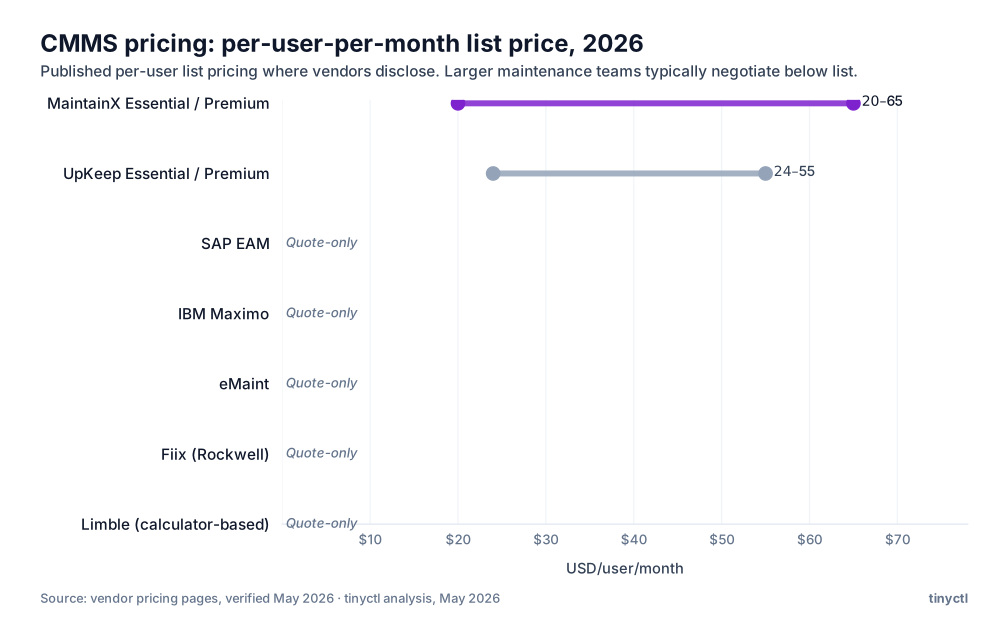
The Best CMMS Software in 2026 — Quick Picks by Maintenance Team Type
| Maintenance team type | Best pick | Why |
|---|---|---|
| Mid-market manufacturer, core preventive maintenance | MaintainX | Mobile-first, fast technician adoption, clean PM scheduling |
| Broad mid-market, multi-site industrial ops | Limble | Strong reporting, good PM logic, scales across sites |
| Mobile-first, field-heavy maintenance crews | UpKeep | Purpose-built mobile UX, simple work order management |
| Larger industrial operations, deeper asset hierarchy | eMaint | More configuration depth, strong compliance and reporting |
| ERP-integrated enterprise asset management | SAP Plant Maintenance / IBM Maximo | When CMMS needs to be part of a broader enterprise asset strategy |
| Light-touch, lean team getting off paper | Hippo CMMS | Simple to deploy, no-frills, low barrier to adoption |
What buying CMMS actually replaces
Most CMMS buyers are not coming from no system at all. They are coming from a spreadsheet, a paper work-order pad, or a maintenance manager with a near-religious memory and ten years of tribal knowledge about which compressors fail in summer and which conveyor bearings make noise before they go. Each of those handover patterns has a different failure mode the software is meant to address.
The spreadsheet shop misses PMs. Not because the maintenance team is lazy — because no one notices an unmet PM in row 412 until something downstream of it breaks. A CMMS pushes the PM as a work order with completion tracking; the failure mode disappears.
The paper-and-tribal-knowledge shop has a key-person risk. When the technician who knew which valves were tricky retires, the institutional knowledge goes with him. CMMS asset records and maintenance history are the only way to capture that knowledge in a form that survives a resignation letter.
The shop with disconnected spare-parts inventory loses on both sides. Critical parts run out at exactly the wrong moment; non-critical parts pile up because no one has consumption data on what’s actually being used. CMMS links parts consumption to assets, which builds a real critical-spares list over time instead of a guessed one.
The platforms worth considering
MaintainX
The platform that comes up most often in mid-market manufacturing evaluations, particularly in food-and-beverage, building products, and discrete manufacturing under 500 employees. Mobile-first design means the technician on the floor doesn’t have to fight a desktop UI translated badly to a phone. Work orders, PMs, asset history, parts consumption — all accessible from a $200 ruggedized phone in a glove box.
The reporting layer is where MaintainX has matured most over the last two years. PM completion rates by technician, work order backlog trending, mean-time-to-repair by asset class — these come standard, not built from custom report-builder gymnastics.
Where it gets weaker: deep ERP integration. If the spec calls for native bidirectional sync with SAP S/4HANA or Oracle Cloud ERP, MaintainX is doable via API but not native. For lighter ERP stacks (NetSuite, Microsoft Dynamics) the integration is straightforward.
Pricing is per-user-per-month. Free tier exists for small teams; Essential is $20/user/month annual, Premium $65/user/month annual. Enterprise quote-only above that.
Limble
The closest competitor to MaintainX in the mid-market, with a slightly different positioning: where MaintainX leads with mobile, Limble leads with reporting depth and multi-site management. The PM logic supports time-based, meter-based, and condition-based triggers; the asset hierarchy handles complex multi-site, multi-department structures without custom configuration.
Where Limble has historically been strong: maintenance teams that need to report up to operations leadership on PM compliance and maintenance ROI. The dashboards give a director-level view that doesn’t require a BI tool layered on top.
Pricing moved to a calculator-based quote model in 2026 — the per-tier published rates that used to be on the pricing page now require running their calculator. Plan for somewhere in the $30K–$80K/year range for a 25-user mid-market deployment, with significant variance based on modules.
UpKeep
UpKeep made its name on the mobile experience for field technicians who weren’t sitting at desks — facilities maintenance crews, distributed industrial assets, building services. The QR-code-on-the-asset, scan-with-phone, get-the-full-history-and-PM-status-on-screen flow works.
The trade-off is feature depth on the manager and reporting side. UpKeep was built to make field work easy, not to give plant managers the kind of cross-cutting reporting that Limble surfaces. For maintenance operations where field execution is the harder problem than reporting, that trade is right. For operations where the manager is the primary user, Limble usually wins.
Essential $24/user/month, Premium $55/user/month, Professional and Enterprise quote-only.
eMaint
A Fluke company, positioned for larger industrial operations with the kind of asset hierarchy, compliance documentation, and reporting customization that mid-market CMMS doesn’t handle out of the box. The strength is configurability — work order workflows, PM logic, asset hierarchy, and reporting are all configurable to match how a specific plant runs rather than how a generic CMMS thinks plants should run.
The configurability is also the weakness. Plants without a dedicated CMMS administrator find eMaint heavier than they need. It rewards the operation that has someone who can own the configuration; it punishes the operation that wants to plug it in and walk away.
Subscription pricing, no public per-seat rates. Pricing depends heavily on configuration scope and module selection.
Hippo CMMS
The simplest entry on this list. Hippo is for organizations that need to get off paper this quarter and don’t need multi-site logic, deep PM scheduling, or ERP integration. Core functions only — work orders, PM schedules, asset records, basic parts inventory — in an interface that doesn’t require training to operate.
The trade is obvious: Hippo runs out of room as maintenance complexity grows. Multi-site, multi-department operations outgrow it within a year. For its target buyer — small plant, lean maintenance team, paper-based today — it’s a defensible first step that can be migrated off later.
Subscription pricing, published on the Hippo website.
CMMS vs EAM vs ERP vs MES
The boundaries between these categories create real buying confusion. Here is how to think about them.
When CMMS is enough
For most manufacturers — particularly those in the mid-market with a single site or a small number of sites — a CMMS is the right tool. It handles the work that prevents unplanned downtime: PM scheduling, corrective work orders, parts tracking, and maintenance history. It does not need to be part of an enterprise asset lifecycle system unless the organization’s asset base, regulatory requirements, or capital planning complexity genuinely demands that.
The decision to buy CMMS instead of EAM is the right one for the majority of manufacturers. EAM is a meaningful additional investment in organizational capability for organizations that have already mastered the basics CMMS provides.
When enterprise asset management is justified
EAM becomes relevant when the organization manages assets at a scale and complexity where capital planning, depreciation, regulatory compliance per asset, and financial integration become genuinely burdensome without a unified system. Large utilities, process manufacturers with significant capital equipment bases, and organizations operating under strict regulatory frameworks (nuclear, pharmaceutical) are typical EAM users. For most discrete manufacturers, it is a category to revisit after CMMS is working well — not a starting point.
When production execution and maintenance must connect
The connection between CMMS and MES software becomes meaningful when maintenance events affect production tracking. If a machine goes down during a work order, that event should be captured in the production execution record — which batch was affected, for how long, and with what quality consequence. In operations where this connection matters, evaluate whether the CMMS and MES platforms can exchange relevant events via API or native integration before committing to either.
For the manufacturing ERP software side, the relevant integration is maintenance cost allocation: which assets are consuming the most in labor and parts, and how does that compare to the capital justification for replacement? CMMS data flowing into ERP cost centers answers that question.
How to Choose Without Buying a Tool Nobody Uses
Technician usability and mobile adoption
The most important thing a CMMS can do is actually get used. A well-designed system that technicians ignore produces worse maintenance outcomes than a spreadsheet that everyone updates, because at least the spreadsheet reflects reality. Evaluate CMMS platforms by putting the mobile interface in front of your actual maintenance technicians before buying — not by reviewing screenshots in a vendor demo.
The platforms that consistently win on adoption (MaintainX, UpKeep) have made mobile usability a design priority, not an afterthought. Technicians who can receive, execute, and close a work order from their phone in two minutes will use the system. Technicians who have to navigate a desktop interface through a phone browser will not.
Asset hierarchy, PM logic, and reporting depth
Beyond adoption, evaluate whether the platform’s PM logic matches how your maintenance actually works. Time-based PM (service every 90 days) is table stakes. Meter-based PM (service every 500 operating hours) requires that the platform can either receive meter readings from operators or integrate with machine monitoring systems. Condition-based PM (service when a sensor reading crosses a threshold) requires CMMS integration with plant monitoring data — which is a more complex integration project.
For business intelligence on top of maintenance data, check whether the CMMS’s reporting export or API is sufficient to feed your analytics layer, or whether that requires third-party integration work.
Parts inventory and integration requirements
Spare parts management in isolation is solved reasonably well by most CMMS platforms. The complexity starts when parts inventory must coordinate with broader inventory management systems or purchasing workflows. If your parts procurement runs through ERP purchasing, the CMMS needs to generate POs or at minimum integrate with the ERP’s purchasing workflow to avoid double-entry. Evaluate this integration early — it is one of the most common sources of CMMS implementation friction in manufacturing environments.
For maintenance budgeting and cost visibility, small business accounting software users should also verify how maintenance costs export from the CMMS before assuming the integration is simple. Maintenance spend needs to appear in the P&L and connect to asset records for depreciation purposes.
And for workforce planning, the shift coverage question matters: a CMMS that tracks technician work orders but cannot tell maintenance managers where they have shift coverage gaps is only solving half the scheduling problem.
FAQ
What is the best CMMS software? For most mid-market manufacturers, MaintainX or Limble. Both combine solid PM scheduling, strong mobile experience, and adequate reporting depth without the complexity cost of enterprise asset management platforms. UpKeep is a strong alternative for mobile-first teams. eMaint is the right choice when more configuration depth is needed.
What does CMMS software do? It centralizes maintenance work management: preventive maintenance scheduling, corrective work orders, asset records, spare parts inventory, and maintenance history. The core value is systematic PM compliance and the institutional maintenance record that makes recurring failures visible and diagnosable.
What is the difference between CMMS and EAM? CMMS manages maintenance work. EAM extends that to cover the full asset lifecycle: capital planning, depreciation, regulatory compliance, and financial integration. Most manufacturers should start with CMMS. EAM is a follow-on investment for organizations with large, complex asset bases and regulatory requirements that demand it.
Can manufacturers use general maintenance software? Yes, for simpler operations. The manufacturing-specific need for production integration, spare-parts coordination, and downtime-to-production reporting starts to matter as operations grow. General facilities tools work well for smaller or simpler operations.